Sometimes, it is fun to analyze data with software. If you don’t agree with that statement, this series of posts is probably not for you. I’ll admit it is one of the geekier statements I’ve made.
This kind of geeky activity has lately acquired the label (and job description) of data science. For paid data scientists, the goal is usually to pull some insight from a data set that can be used to make more money. For me, the end goal is not so important - I just enjoy playing with a good data set; visualizing it in various ways, testing hypotheses against it, and revealing ‘interesting’ facets contained within it. Inevitably, minor mysteries come up along the way, so the effort is also part detective story.
This post kicks off a series of posts about obtaining, curating, analyzing, and modeling some data that I gathered as part of a for-fun retirement project. Along the way, some armchair science will be applied, and some data science tools and techniques will be used. I have no illusions that any results obtained in this series of posts are relevant to anybody other than myself, though it may be interesting to inspect some of the Purty Graphs. My hope is that these posts may inspire someone to undertake similar ‘personal science’ projects. The point is not the results; it’s the journey.
Data Science Tools
Most practicing data scientists use Python for data analysis. There are good reasons for this - Python and the vast array of available (and free!) packages that extend and augment the Python environment are great for putting together interactive data analyses. Using the Python ecosystem allows you to “go where the analysis takes you” as you learn more about the data set. Python packages such as pandas, NumPy, and matplotlib cover a lot of data science ground. The data analysis for these posts was done using Python in VS Code (also free!). Within VS Code, I am using Jupyter notebooks, which allow for intermixing Python code with text and graphics output by the Python code, making the environment seem even more interactive.
Python and its available libraries are already nice for data science; Jupyter just makes it slightly nicer, in my opinion. And like many coding environments, AI can make it even nicer if you use the right AI tool. As mentioned in Switching AI Tools, my foray into using Python for data science caused me to switch AI tools from Warp to the GitHub Copilot integrated into VS Code. So far, this has been a good change for me. AI has been very useful for me in producing code to create plots and visualizations. This kind of code is not terribly challenging to write, but it is tedious. It is mostly about being familiar with the API of the plotting package you are using and with the data structures holding the data, and welding the two together. AI is very good at that in my experience. I can tell AI something like “Create a cross-plot of Air Temperature vs Relative Humidity,” and it knows enough about the plotting API and the Python data structures I have used to write the straightforward but finicky code that makes the plot. As always with AI coding, I then carefully inspect the code and sometimes tweak it manually to get what I want. But AI can at least provide a very good starting point. AI coding requires a small enough investment of time and effort that, if I’m not happy with the outcome, I can delete the generated code and revisit it later if needed.
Data from my Backyard
OK, so what data did I use for my foray into data science?
I am fortunate enough to have an in-ground swimming pool in my backyard. I consider the pool to be one of the most extravagant (read: expensive to have and maintain) aspects of my life. I love swimming in it, but during the fall the pool water is starting to get cool enough that swimming is less fun. I thought it might be interesting to track the temperature of my pool as it cooled off this past fall and winter, so I bought a wi-fi enabled floating pool thermometer from Govee and set it up. I chose this particular model because it can automatically measure my pool water temperature every 10 minutes and store the data somewhere in the cloud for free. I can download that historical data in a convenient CSV format whenever I want.
I then wrote Python code to read and QC the data and make it available for any data science that I wished to do on it. Here then is a plot of the raw pool temperature data for the last few months:
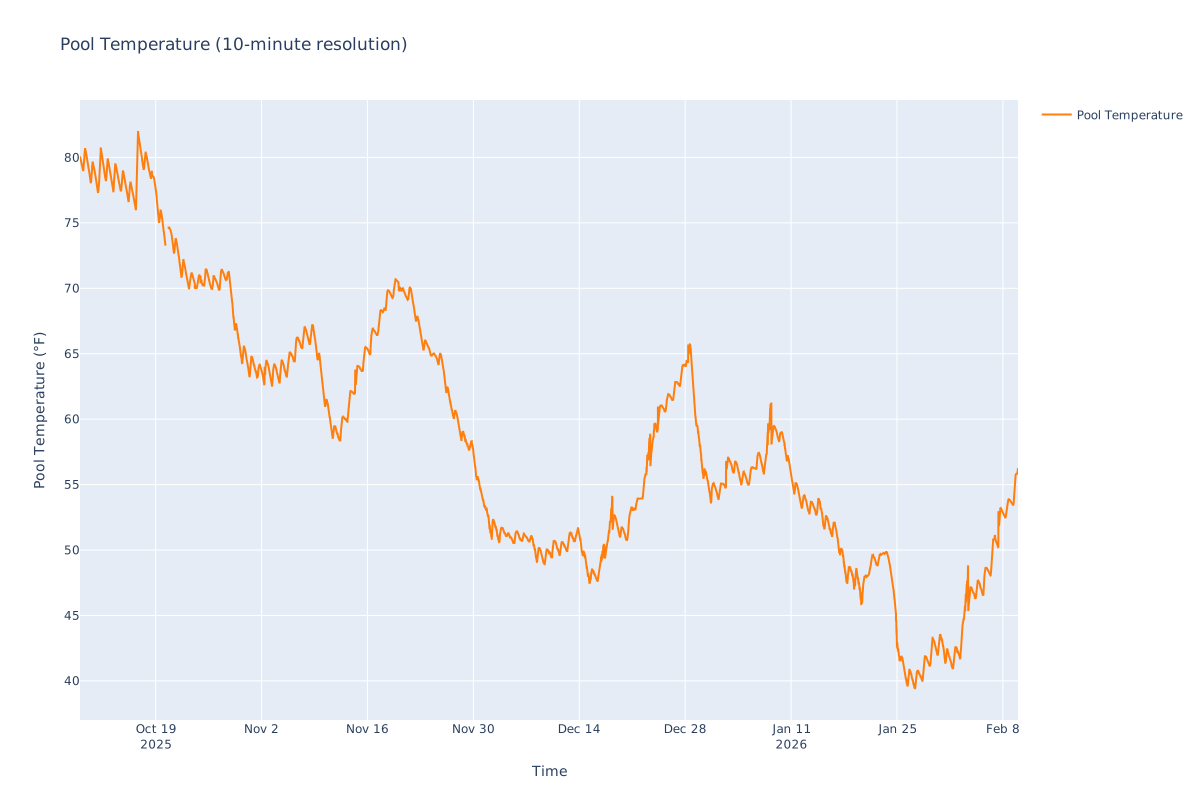
Pool water temperature as a function of time
For this plot, I used a Python library called Plotly, which makes nice-looking plots that can be interactively panned and zoomed within the Python environment. Here in these posts, you can enlarge the plots by clicking on them.
Note how dynamic the data is. The daily variations in pool temperature caused by warmer air temperatures and sunshine during the day and cooler air temperatures at night are clearly visible. So are the longer-term temperature trends: the pool started out swimmably warm, cooled gradually until a cold snap on Oct 27 officially ended swimming season. The temperature then seesawed through warm weather and cold snaps (that’s Texas weather for ya), including a freakishly warm week around Christmas and a brutal record-setting winter storm at the end of January.
Interesting note: there is a gap in the data on Oct 20, which coincides with the Amazon AWS infrastructure outage that affected many products and services that relied on AWS, apparently including Govee.
dT/dt
An interesting quantity to calculate from the pool temperature data is the rate at which the pool temperature changes, which I’m calling \(\frac{dT}{dt}\) ala calculus. It is perhaps more simply thought of as just the difference between each pair of adjacent temperature measurements divided by the amount of time between those measurements. The units for \(\frac{dT}{dt}\) are then [temperature / time]. Here is a plot of \(\frac{dT}{dt}\) superimposed on the pool temperature.
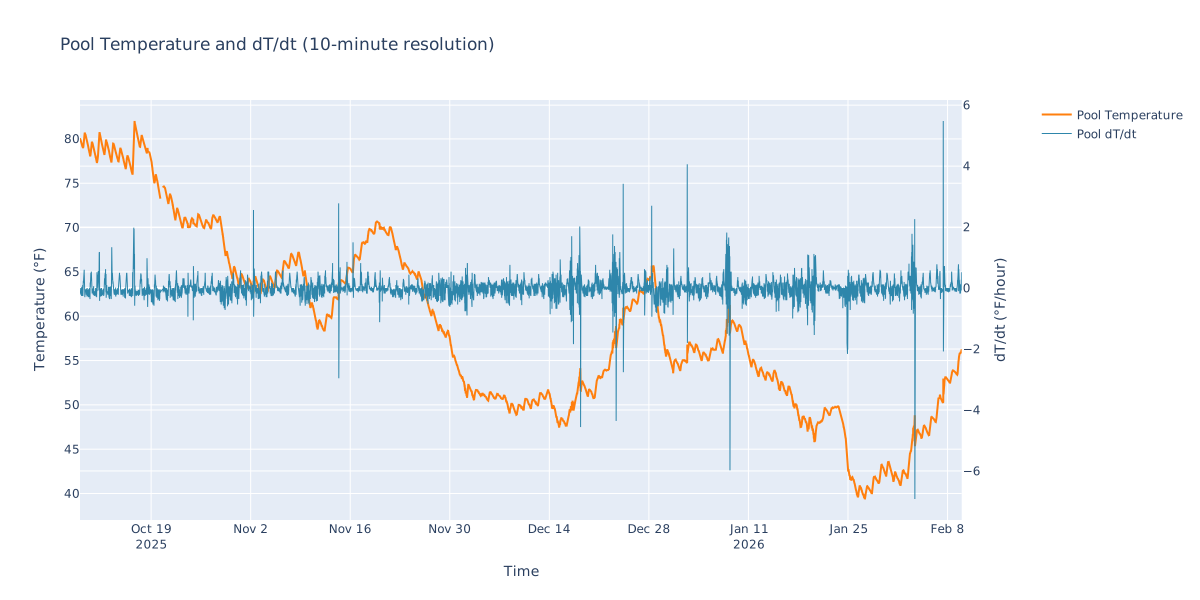
dT/dt and pool temperature
With a zoom-in to an arbitrary time span shown here:
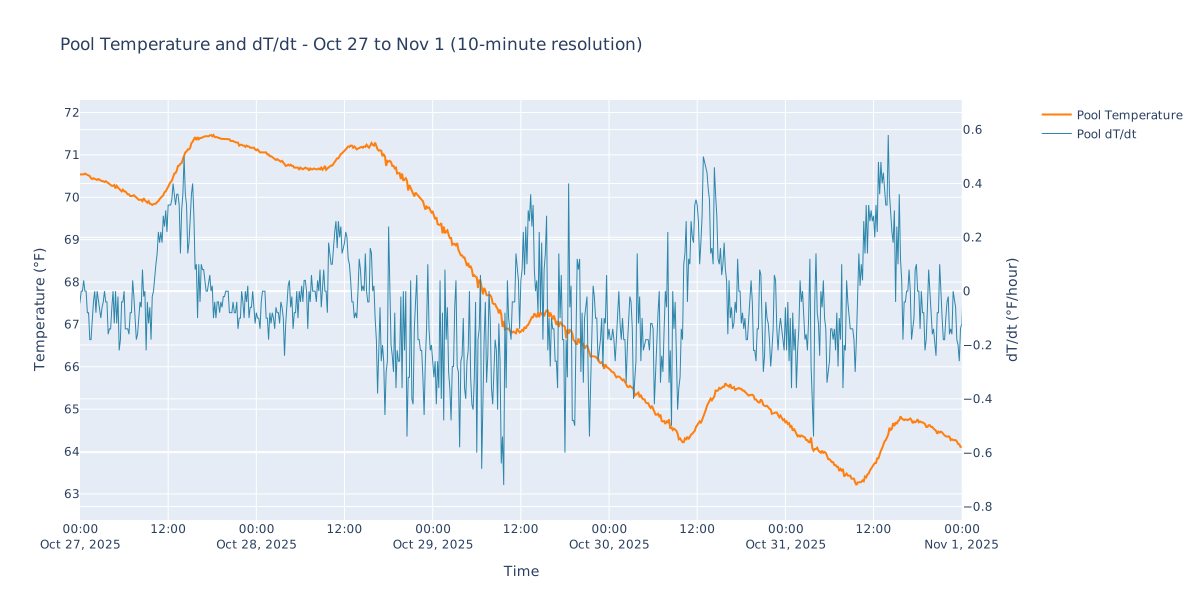
dT/dt and pool temperature zoomed
You can see that \(\frac{dT}{dt}\) is positive when the pool is warming, negative when it is cooling, with values generally in the range of plus or minus a degree Fahrenheit (degF) per hour.
It is well known that whenever you calculate the rate of change of a measured data value, noise will be emphasized. One noisy reading of temperature can generate a spike in \(\frac{dT}{dt}\) because even a small amount of noise that makes a small change in temperature is divided by a short sample interval (e.g., 10 minutes). This can produce a large spike in \(\frac{dT}{dt}\). Then, if the next temperature reading is ’normal’ (not noisy) and returns to a more realistic value, there will be a spike in the opposite direction. So noise or bad readings can generate pairs of opposite-polarity spikes in \(\frac{dT}{dt}\).
Here is a zoomed-in portion of the plot showing a potential noise spike:
dT/dt and pool temperature 'noise' spike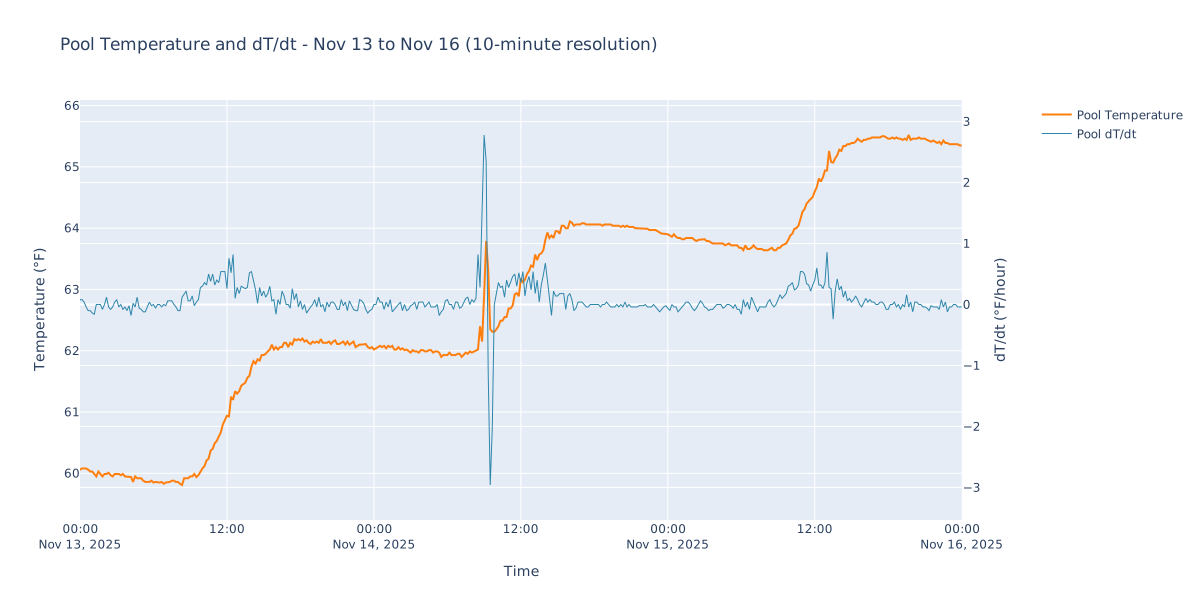
Note how a modest change in pool temperature (about 1.5 degF) produced a prominent spike pair in \(\frac{dT}{dt}\).
One way to tame spikes in \(\frac{dT}{dt}\) is to average several consecutive readings together - say, six readings taken every 10 minutes into one hourly value. I will do this later, but first it can be interesting to see what the 10-minute resolution ’noisy’ data might be telling us.
Pump Start Glitches
I noticed something interesting about some (but not all) of these \(\frac{dT}{dt}\) spike pairs: they occurred preferentially at about 9:20 AM, which is the time at which the pool circulation pump turns on each morning (it is on a timer). This doesn’t seem like a coincidence. And the first \(\frac{dT}{dt}\) spike in the pair was always in the positive direction, so the temperature got suddenly warmer then cooled off again to make the negative spike. If the spikes were due to random noise, they probably would be equally likely to be positive or negative temperature excursions, and they certainly wouldn’t be prone to occur at the same time each day. The noise spike shown above is one of these pump start glitches.
So why would starting the circulation pump cause a short-lived rise in pool water temperature? It would seem that starting the pump somehow provides a burst of warmer water to raise the temperature, then the temperature goes back down as the warmer water mixes with the rest of the pool water. Why would starting the pump provide a burst of warmer water? I can think of a few possibilities:
-
The pool has a smaller attached spa. When the pump is not running, the water in the spa is not in contact with the rest of the pool water. After the pump starts, water from the spa runs over the edge of the spa and waterfalls into the pool. It so happens that the pool temperature sensor is located near this waterfall from the spa. If the spa water was somehow warmer than the rest of the pool, this warmer water would cascade into the pool near the temperature sensor when the pump started, temporarily increasing the readings.
-
Maybe water that sat in the plumbing overnight, which has been exposed to the ground temperature and a bit to the air temperature, has warmed more than the pool water. When the pump starts this warmer water enters the pool.
-
(a more distressing thought) Sometimes, when the pool pump starts, it doesn’t always prime itself quickly. This means that the pump is running for a few minutes but no water is flowing through it, so the pump itself gets very hot. Maybe when the pump eventually primes and water starts flowing, that first bit of water has been heated up by the hot pump, and so causes the sudden temperature rise.
I don’t have enough data to decide if any of these possibilities are correct, but I think the first scenario is the most likely. I can think of further ’experiments’ that I could do to explore the possibilities, e.g. putting another temperature sensor in the spa to see if the spa temperature is ever significantly different from the main pool temperature. Maybe some day…
Noisy Night Glitches
I noticed a second type of data glitch, three examples of which are shown in this plot:
Three 'noisy night' data glitches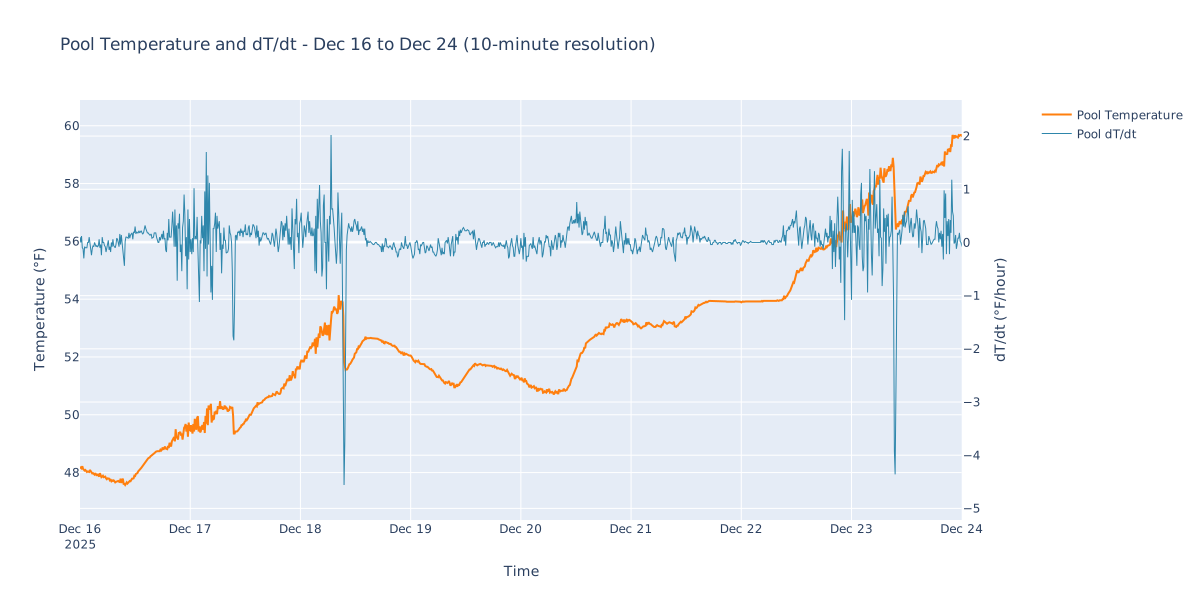
The characteristics of this glitch are that the readings become erratic starting in the early evening. They remain erratic all night, but there is an upward trend in the temperatures. Then in the morning, when the circulation pump starts, the temperature dives down to a more normal reading and stays there. This is a single negative-going spike in \(\frac{dT}{dt}\), not an opposite-polarity dual spike pair. If you mentally subtract out the erratic, rising overnight readings and just draw a straight line from where the glitch started to the temperature it jumps down to in the morning, you get a more reasonable temperature profile for the night, which leads me to believe that the temperature rise during the glitch is somehow not real and that readings returned to normal after the pump started in the morning.
I have no good explanation for the mechanism behind these glitches. I tried looking for possible causes by looking at what was going on weather-wise during those glitches (see next post in the series), and nothing stood out. E.g., it was not exceptionally hot or cold, nor particularly windy, during those episodes. It was humid with a trace of rain during two of the episodes but not the third.
Heating the Pool
On Oct 16, I turned on our pool heater from about noon until 4 PM. If you look closely at the first plot, you can see the jump in the pool temperature; the temperature went from a chilly 76 degrees to a more comfortable 82 degrees, as can be seen on this plot zoomed in to those dates:
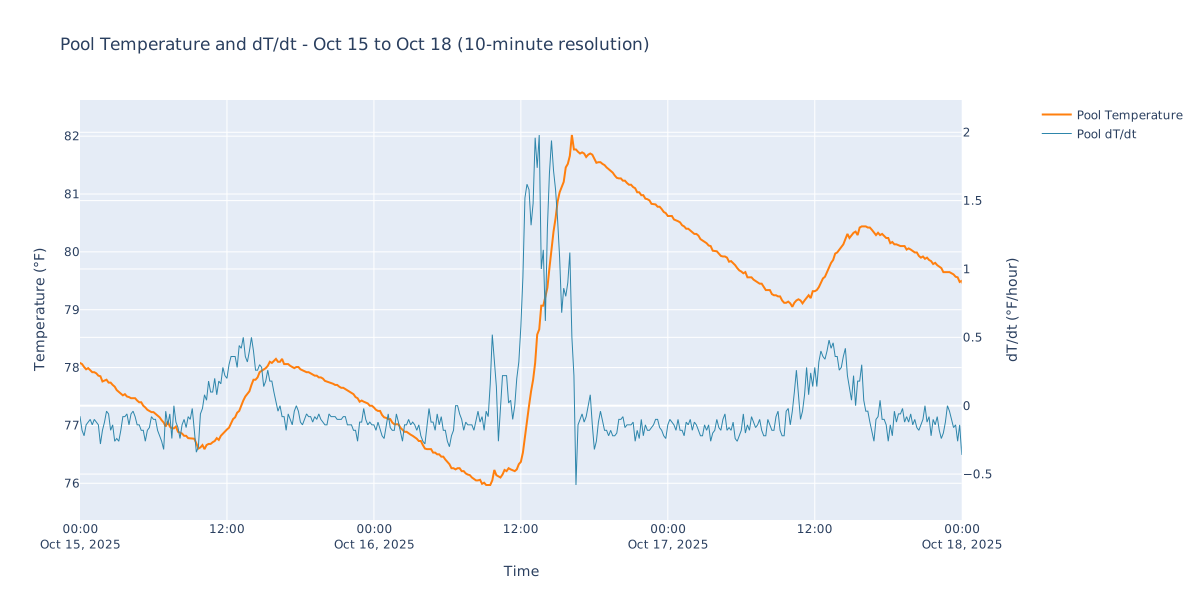
Running the pool heater
From the plot of \(\frac{dT}{dt}\), the pool temperature increased by about 1.7 degF/hr while the heater was running during that afternoon. But since I heated the pool during a fairly warm sunny afternoon, the pool was warming during that time anyway, so not all of this nice heat was delivered by the heater. From the days on either side of Oct 16, which were similarly warm and sunny, the pool tended to warm by about 0.3 degF/hr during the afternoon even when the heater was off. So the heater can manage to heat the pool about 1.4 degF/hr on its own, which is a somewhat useful number for me to know.
A quick sanity-check calculation can be made here. I know that the pool heater is rated at 400,000 BTUs/hr1. A BTU (British Thermal Unit) is a unit of energy measuring the amount of heat energy needed to raise one pound of water by one degree Fahrenheit. (Those Brits and their wacky units.) Since a gallon of water weighs about 8.34 pounds at temperatures we care about, one BTU can raise the temperature of a gallon of water by about 0.12 degF.
I happen to know that the pool contains about 23,500 gallons of water. So heating the pool by 1 degF/hr would take
23500 / 0.12 \(\approx\) 200,000 BTU
This gives us the heat capacity of the entire pool - the proportionality constant between heat energy injected and the temperature change \(\frac{dT}{dt}\). Heat capacity is also sometimes called the thermal mass when it refers to a complicated composite system like a pool or a building.2 So:
\[ \frac{dT}{dt} = \frac{H}{m_{th}} \]where H is the injected heat energy and \(m_{th}\) is the thermal mass:
\(m_{th}\) = 200,000 BTU/degF = \(3.8 \times 10^8\) J/degC
for the pool. (The more standard units for energy are Joules, and the more standard units for temperature are degrees Celsius.)
So if the heater were delivering every bit of the 400,000 BTUs of heat to the pool water, I would expect it to be able to raise the temperature of the pool by
\(\frac{dT}{dt}\) = 400,000 / 200,000 = 2.0 degF/hr.
This is in the same ballpark but significantly more than the measured 1.4 degF/hr. Somehow about 30% of the heat produced by the heater (according to its BTU rating) is getting lost before it gets into the pool. This is a little concerning. While it is true that pool heaters become less efficient at generating/delivering heat over time, and this heater is over 20 years old, an efficiency drop of about 30% seems like a lot.
My heater is powered by natural gas, and I pay about $2 for 100,000 BTUs of natural gas (which is not a rate that I’m terribly happy with). I also read that the heater is theoretically 82% efficient at converting ‘input’ energy (natural gas) to ‘output’ heat energy (warmer pool water)3. So I would pay about $4.80 to raise my pool temperature by 1 degF.
Adding Air Temperature Data
I also bought some temperature and humidity sensors from Govee, and hung one of them on a tree near the pool. I can download the air temperature and humidity data along with the pool temperature data. This plot shows how the pool temperature varied along with the measured outside air temperature.
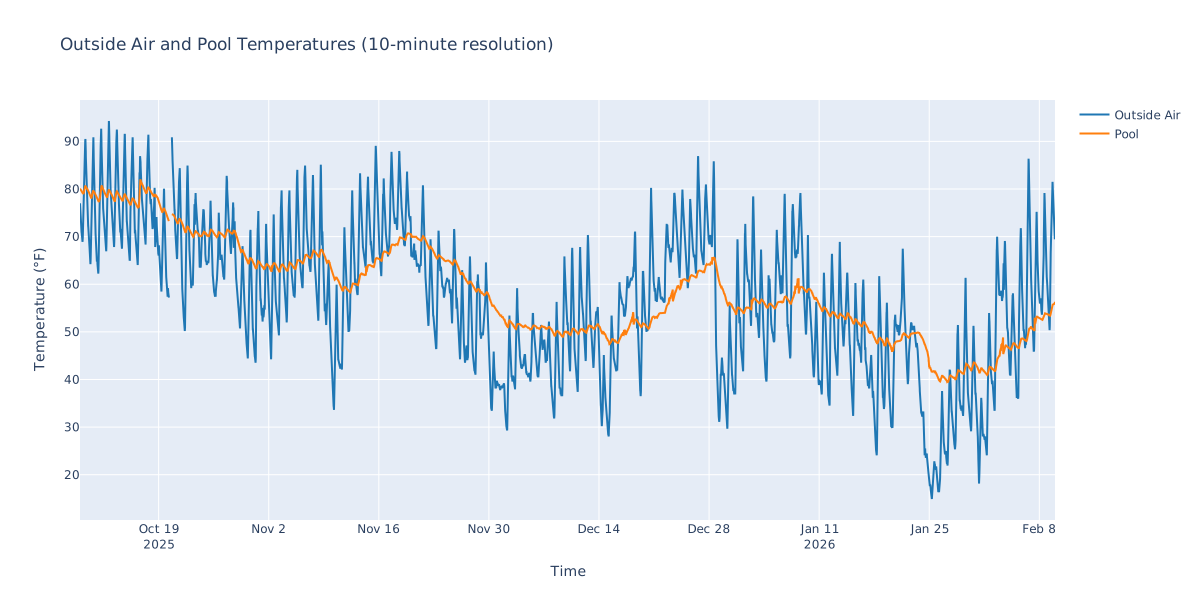
Pool and Air Temperatures
Here is a plot zoomed in to a drastic change in temperature that happened in late January.
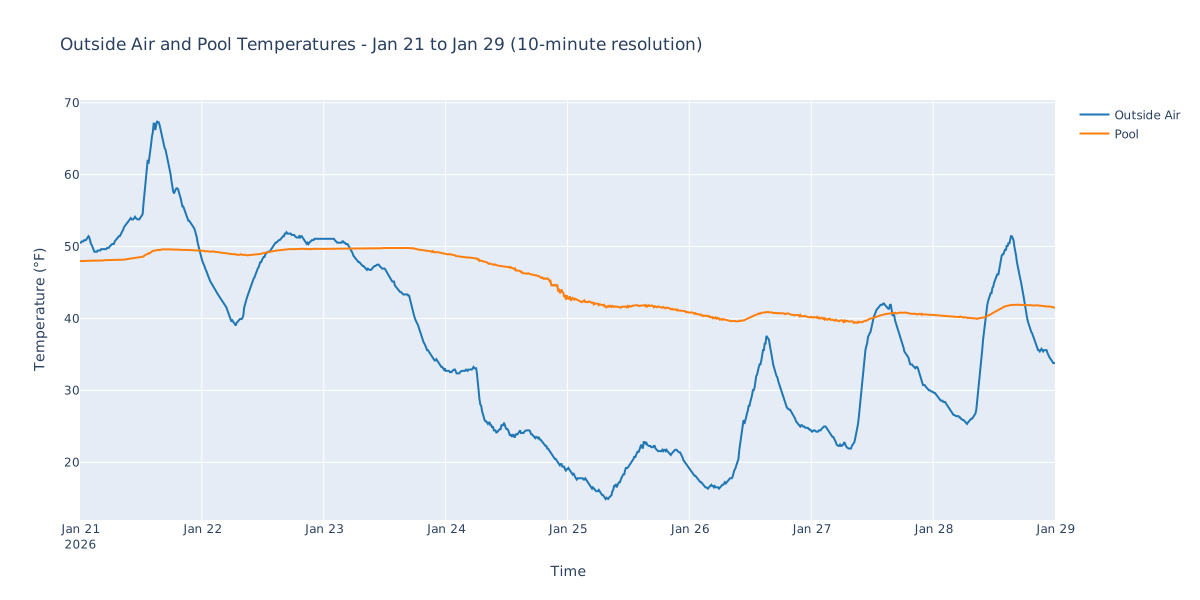
Pool and Air Temperatures during cold snap
Obviously the outside air temperature correlates with the pool temperature. You can perhaps convince yourself that, since there seems to be a lag in the response of the pool temperature to a change in air temperature, that the air temperature has a causative effect on the pool temperature.
However, this plot of the measured relative humidity (from the same sensor near the pool) doesn’t show such a clear relationship with the pool temperature.
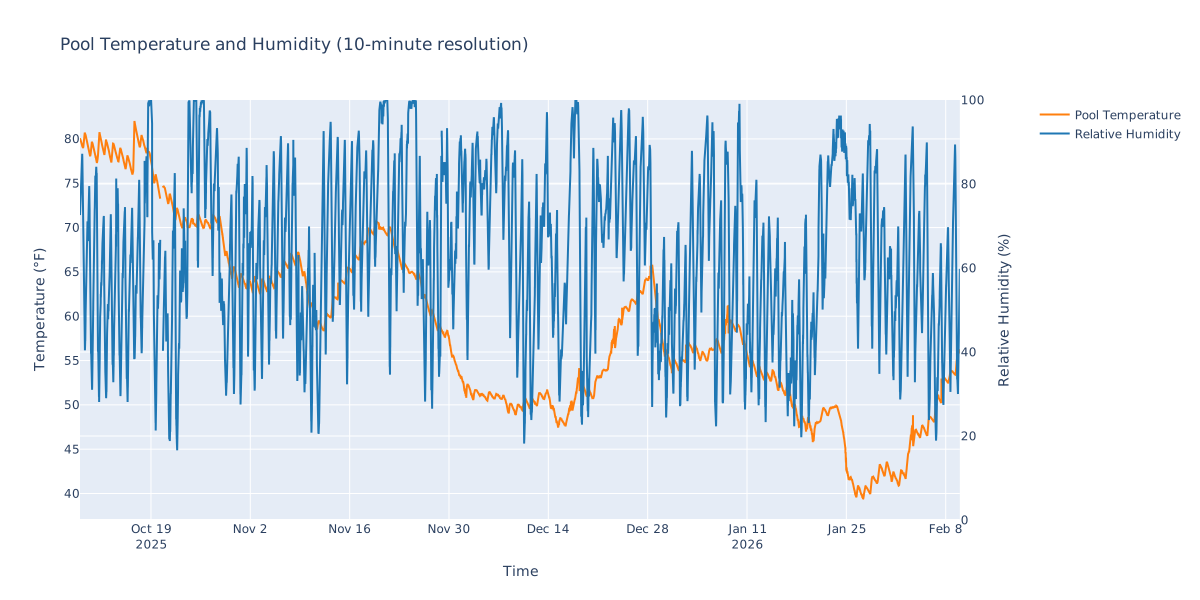
Pool temperature and humidity
So what exactly is the relationship among air temperature, humidity, other weather variables, and pool water temperature? This will be explored in future posts in this series.
-
Heaters and air conditioners are rated in BTUs. But a BTU is a unit of heat energy, and heaters and air conditioners add or remove heat per unit time. So when BTUs are reported for a product, “per hour” is implied. So ideally the pool heater can deliver 400,000 BTUs/hr to the pool. ↩︎
-
As mentioned in the Wikipedia page, there is some disagreement over the definition of thermal mass. I’m considering it to be a synonym for heat capacity here. ↩︎
-
This efficiency is from marketing materials for the pool heater, it is the ‘fuel efficiency’ of the heater itself. BTU ratings are usually ‘output’ heat - the amount of heat actually delivered. A heater may consume more BTUs worth of fuel (e.g. natural gas) to produce that amount of delivered heat. This fuel efficiency is different than the efficiency I mentioned earlier, where it seems that only about 70% of the rated heat output from the heater is actually making the pool warmer. ↩︎